Oops! Something went wrong while submitting the form.
Mobile Wallet Loyalty Card Registration Page
Enable secure loyalty program enrollment and automatically deliver a mobile wallet loyalty card
Objectifs
Improve customer satisfaction and loyalty
Encourage repeat sales
Gain a unified view of the customer
Secteurs
Thank you! Your submission has been received!
Oops! Something went wrong while submitting the form.
Balises
Thank you! Your submission has been received!
Oops! Something went wrong while submitting the form.
Thank you! Your submission has been received!
Oops! Something went wrong while submitting the form.
Thank you! Your submission has been received!
Oops! Something went wrong while submitting the form.
Thank you! Your submission has been received!
Oops! Something went wrong while submitting the form.
Thank you! Your submission has been received!
Oops! Something went wrong while submitting the form.
Descriptif
This use case allows brands to seamlessly onboard customers into a loyalty program through a dedicated registration landing page with double opt-in verification. By confirming identity via email before activating the program, brands ensure clean data and compliant consent management. Once verified, customers automatically receive their mobile wallet loyalty card via email and SMS, creating immediate value and engagement. The result is a frictionless, secure loyalty enrollment experience that drives long-term retention.
A contact registers for the loyalty program through a dedicated landing page by submitting their personal details. The system sends a verification email to confirm the contact’s identity using a double opt-in mechanism. After the contact clicks the confirmation link, the registration event is recorded and the loyalty program workflow is completed. The contact then receives their mobile wallet loyalty card through automated email and SMS delivery.
Étape par étape
1
Loyalty registration form submission:
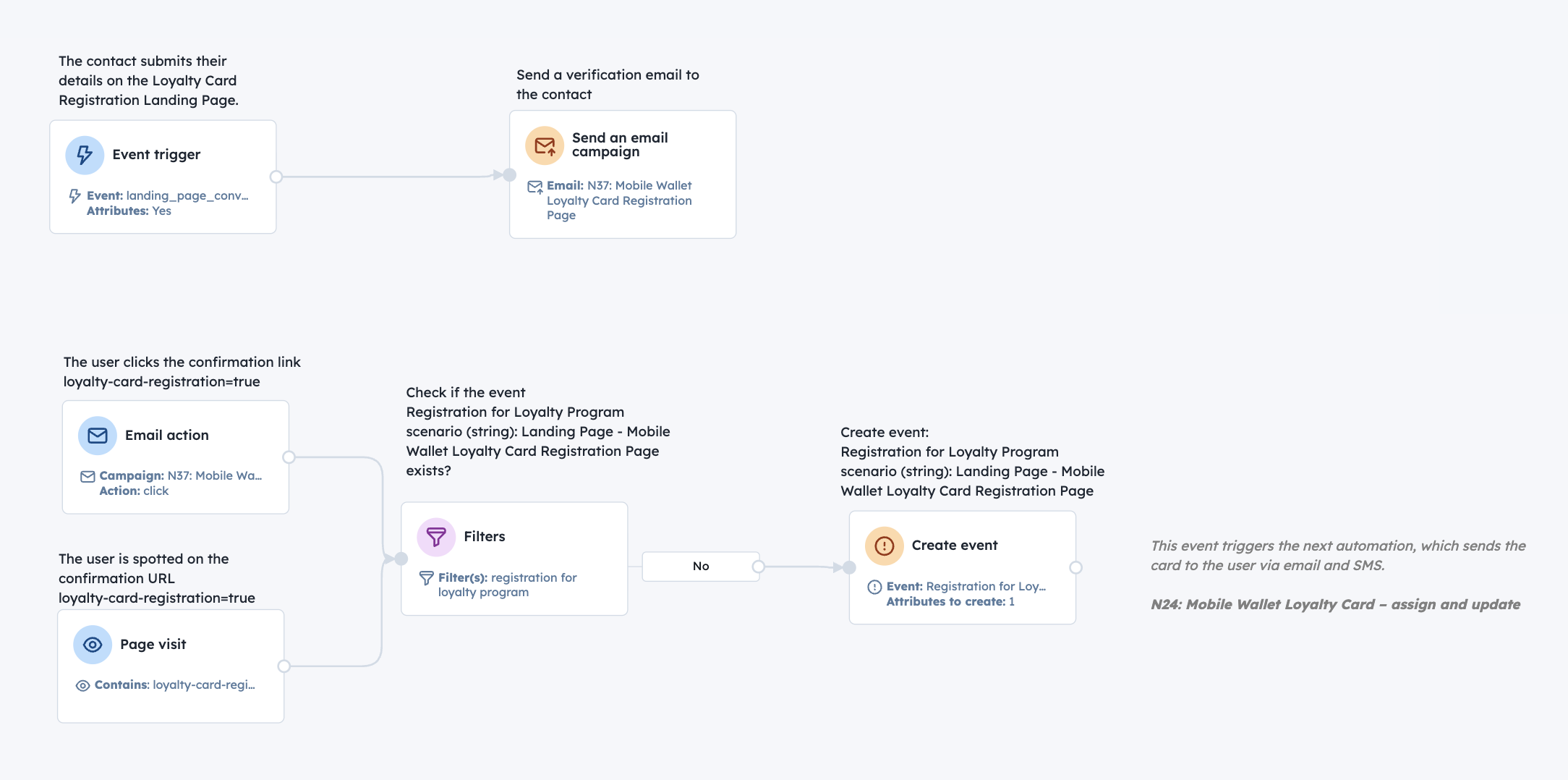
The contact submits their first name, last name, email address, phone number, and SMS consent on the Mobile Wallet Loyalty Card Registration Landing Page
2
Verification email sent:
Immediately after submission, the system sends a verification email containing a confirmation link with a parameter such as loyalty-card-registration=true to validate the contact’s identity
3
Double opt-in confirmation:
When the contact clicks the verification link, the system confirms the double opt-in and validates the registration request
4
Loyalty program registration event creation:
Upon successful verification, the system creates the event Registration for Loyalty Program with the scenario set to Landing Page – Mobile Wallet Loyalty Card Registration Page
5
Loyalty card assignment and delivery:
The "Mobile Wallet Loyalty Card – assign and update" use case is triggered, automatically assigning the loyalty card and delivering it to the contact via email and SMS
Detail user scenario
Step-by-step
1
Loyalty registration form submission:
The contact submits their first name, last name, email address, phone number, and SMS consent on the Mobile Wallet Loyalty Card Registration Landing Page
2
Verification email sent:
Immediately after submission, the system sends a verification email containing a confirmation link with a parameter such as loyalty-card-registration=true to validate the contact’s identity
3
Double opt-in confirmation:
When the contact clicks the verification link, the system confirms the double opt-in and validates the registration request
4
Loyalty program registration event creation:
Upon successful verification, the system creates the event Registration for Loyalty Program with the scenario set to Landing Page – Mobile Wallet Loyalty Card Registration Page
5
Loyalty card assignment and delivery:
The "Mobile Wallet Loyalty Card – assign and update" use case is triggered, automatically assigning the loyalty card and delivering it to the contact via email and SMS
Comment le mettre en œuvre ?
La mise en œuvre de l'automatisation des cas d'utilisation implique plusieurs étapes et outils clés. Voici des ressources complètes pour vous aider à démarrer :
Modules d'occasion
Pop-Ups
Collect information from your visitors and navigate them on the website.
SMS Messages
Automate SMS delivery based on user actions or specific conditions.
Push Notifications
Delivers personalized notifications to users of your website (webpush) or app (mobile push).
Contact attribute is a named data field that describes a specific property of a contact stored on its profile and used for segmentation, personalization, reporting, and automation.
Attribute name
Attribute type
first_name
(standard) string
last_name
(standard) string
email
(standard) string
phone_number
(standard) phone number
Consent SMS
(custom) boolean
Events
An event is a custom piece of information about something your contact does.
Event name
Event attributes
Registration for Loyalty Program
(string) scenario
No items found.
Join others who leveraged this use-Case
No items found.
Cheat Sheet
To bring your use-case to the next level check how you can use the following methods:
Set up your own domain for landing pages.
Read more
Discover the Perfect Use-Case for Your Company
Don't waste time on repetitive tasks. Let automations handle it.
Thank you! Your submission has been received!
Oops! Something went wrong while submitting the form.

.svg)

.svg)
.svg)





.svg)
.svg)


.svg)


.svg)

