
Celebrate
Birthday & Celebrations
December is the most competitive month in email marketing. The average subscriber receives 2-3x their normal email volume. Most of it gets ignored. These Christmas templates help you cut through with seasonal designs your audience trusts. Announce sales, share wishes, build a gift guide. Customize everything with Positive User's drag-and-drop editor.
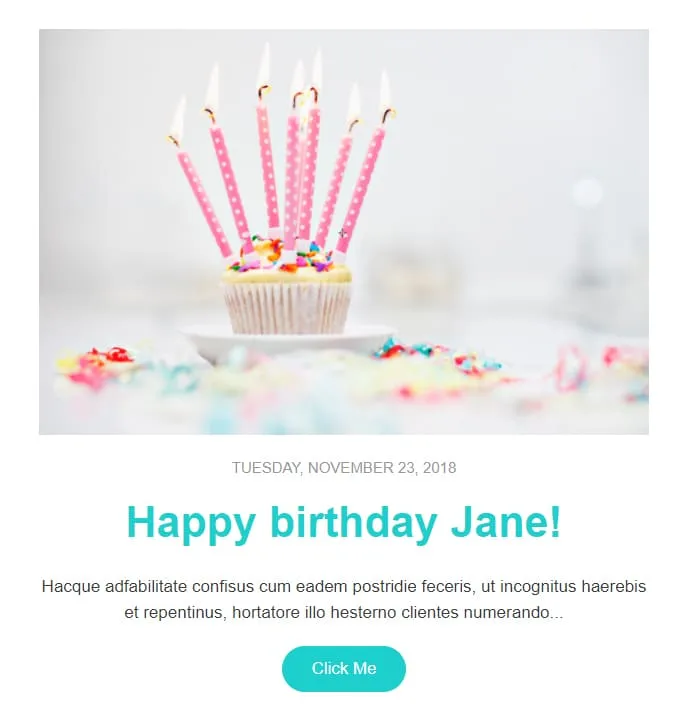
email templates galleryComing SoonBirthday automation needs warmth, not paragraphs. Celebrate gives you one cupcake photo, one date stamp ('Tuesday, November 23, 2018'), one first-name headline ('Happy birthday Jane!'), one short paragraph, and one teal Click Me button. Pull in the merge tag, schedule the send, walk away.


Coming SoonKids events need a single CTA but parents need three colours of urgency. Family Event splits each Activity into its own coloured block — pink, blue, orange, pink-with-bee-and-flower — each carrying a Book Now button. A 'Parents & Kids Activities' royal-blue intro panel sets the tone, a yellow-framed family circle photo anchors the middle, and three teal/blue/turquoise contact blocks (CONTACT US / FOLLOW US / VISIT US) close out the page. For family centres, kids workshops, and parent-toddler clubs.

Coming SoonThe first email after signup is the only one with a guaranteed open. HappyWelcome treats it like a party invitation: a royal-blue frame with cursive 'HappyWelcome' logo, a 'Welcome!' card with paragraph and pink Click Me, and a party flat-lay photo (confetti, candles, ribbons, gift box). Then a teal 'Holiday offer' image-text row paired with cake-and-candy photography, a reverse purple 'Holiday offer 2' row, and a dark navy footer with cursive brand and 3-icon social row. For onboarding sequences, birthday clubs, and 'thanks for joining' moments.
Christmas Email Templates?Pre-designed layouts get campaigns live faster. December is not the month to spend three days pixel-pushing. Focus on strategy, offers, and customer support.
Professional designs keep your emails polished and on-brand. Desktop, mobile, Gmail, Outlook. All covered without separate testing for each client.
The data says yes. Festive elements and holiday palettes consistently drive higher open and click rates during December compared to standard designs.
Every template is built mobile-first. Your holiday campaigns look sharp on any screen size. No pinch-zooming. No broken layouts.
Christmas email templateBest PracticesLate November. Tuesdays and Thursdays deliver the strongest engagement. But your first holiday email should go out before Black Friday is even over.
A live timer creates urgency. But it has to point to an actual shipping cutoff or offer expiry
Last-minute buyers need different messaging than early planners. Loyal customers deserve better offers than first-time visitors. Segment by behavior, not demographics.
Holiday keywords and seasonal emojis help visibility. But be specific about what's inside. "25% off holiday gifts" drives clicks. "Happy holidays from us" doesn't.

Buttons like "Shop Now" or "View Gift Guide" should pop against the festive background. Every section has one job. Keep the path simple.
Christmas Email Content
Boxing Day and New Year transitions. Keep momentum with refreshed visuals and extended offers.
your Christmas emailDeliverability is more fragile in December
When every brand triples their send volume, ISPs get stricter. Clean your list before the holiday push. Remove bounced addresses and suppress inactive contacts.
Have you tested on mobile?
Holiday shoppers browse on phones between dinner prep and family conversations. A broken layout during the busiest week costs real money.
Interactive elements earn attention
Countdown timers. Gift guides. Festive animations. They give subscribers a reason to engage instead of scroll past.
Can they find the CTA instantly?
Contrast matters more when the design is visually rich. Make the button the clearest element on the page.
What do you know about this subscriber?
Purchase history and browsing data help you recommend products they care about. A personalized holiday offer converts far better than a generic one.
Specific subject lines beat festive ones
"25% off holiday gifts" drives action. "Merry Christmas from our team" gets a smile but not a click. Lead with value.
Holiday touches should enhance, not overwhelm
A clean layout with clear sections lets offers and visuals do the work. Restraint makes the design feel more premium.
Positive User's holiday templates and built-in automation. Festive, professional, and ready in minutes.