
Celebrate
Birthday & Celebrations
Birthday emails are among the highest-revenue automated messages you can send. Industry benchmarks consistently rank them above standard promotional campaigns. These templates help you deliver personalized wishes, exclusive rewards, and milestone celebrations that build loyalty on autopilot. Pick a design, connect your data, and let Positive User's automation handle the rest.
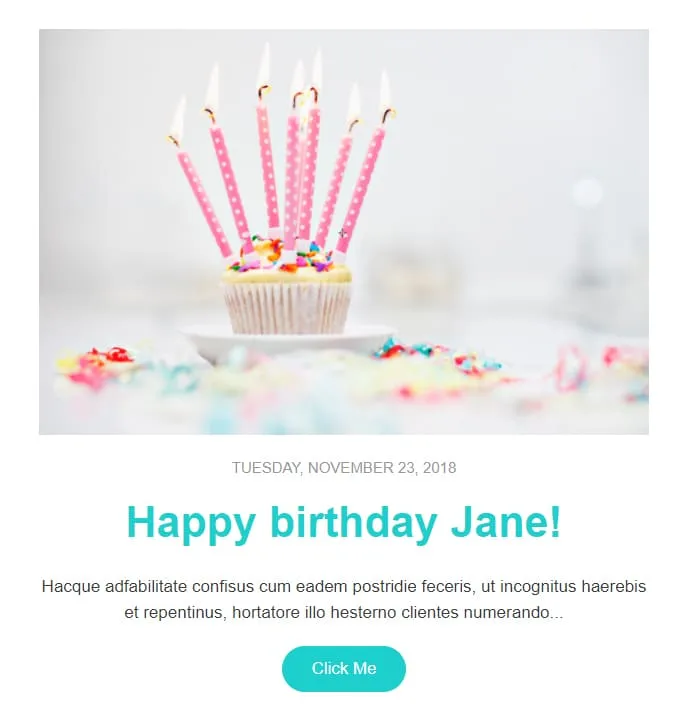
templates galleryComing SoonBirthday automation needs warmth, not paragraphs. Celebrate gives you one cupcake photo, one date stamp ('Tuesday, November 23, 2018'), one first-name headline ('Happy birthday Jane!'), one short paragraph, and one teal Click Me button. Pull in the merge tag, schedule the send, walk away.


Coming SoonKids events need a single CTA but parents need three colours of urgency. Family Event splits each Activity into its own coloured block — pink, blue, orange, pink-with-bee-and-flower — each carrying a Book Now button. A 'Parents & Kids Activities' royal-blue intro panel sets the tone, a yellow-framed family circle photo anchors the middle, and three teal/blue/turquoise contact blocks (CONTACT US / FOLLOW US / VISIT US) close out the page. For family centres, kids workshops, and parent-toddler clubs.

Coming SoonThe first email after signup is the only one with a guaranteed open. HappyWelcome treats it like a party invitation: a royal-blue frame with cursive 'HappyWelcome' logo, a 'Welcome!' card with paragraph and pink Click Me, and a party flat-lay photo (confetti, candles, ribbons, gift box). Then a teal 'Holiday offer' image-text row paired with cake-and-candy photography, a reverse purple 'Holiday offer 2' row, and a dark navy footer with cursive brand and 3-icon social row. For onboarding sequences, birthday clubs, and 'thanks for joining' moments.
birthday & celebration email templates?Build a birthday workflow today. Every customer gets a personalized email on their day, every year. No manual work. No calendar reminders. No forgetting.
Birthday emails consistently achieve open rates well above standard marketing campaigns. Add a relevant offer and conversions follow naturally.
Transactional emails keep things running. Celebratory ones build the relationship. A birthday email says "we know you and we care." That's the gap these templates close.
At home on the couch. On the bus. Mid-birthday dinner. Fully responsive and fast-loading on any device.
celebration email templatebest practicesA birthday month kickoff. A half-birthday surprise. A "your gift expires in 3 days" reminder. Each touchpoint extends the window for redemption and keeps your brand visible.
A 5% discount on a $200 product doesn't feel like a birthday gift. A meaningful offer, a free item, or a genuine upgrade does. Match the gesture to the occasion.
Their name in the subject line. Their name in the body. No product grid competing for attention. The birthday email is about the relationship. The product pitch can wait for tomorrow.
"Valid for 7 days" gives the offer structure. Without a deadline, birthday coupons sit unused. With one, redemption rates increase meaningfully.

"Happy Birthday! Here's 20% off" works better than vague greetings that don't promise anything. Clear value. Festive tone. The combination drives opens.
email content your celebration emailsDoes the email feel like a celebration or a catalog?
If it looks like a product grid with a birthday banner on top, rethink it. The design should feel festive first. The offer supports the celebration, not the other way around.
Mobile preview first, always
Most personal emails get checked on phones. If the greeting breaks on a small screen, the moment is gone.
Specificity creates emotion
"3 years with us" lands harder than generic loyalty copy. The more data you pull in, the more the email feels handwritten.
Does the button match the moment?
"Claim My Gift" or "Treat Myself" feel more inviting than "Shop Now." Match the CTA to the celebration.
Watch your image weight
Balloons and confetti look great. A 5-second load time doesn't. Compress so the email loads instantly. Especially on mobile data.
Turn every milestone into a loyalty-building moment. Positive User's templates and automation handle the rest.