Summary
Sales workflow automation uses software to run the repetitive, rule-based steps of a sales process: CRM data entry, lead routing, follow-up emails, reminders and internal alerts. Each step starts from a trigger, such as a quote request or a deal stuck at a stage. Negotiation, complex deals and key accounts stay with people. The rule of thumb: automate what follows a rule, keep what needs judgment.
{{BUTTON-1}}
A prospect requests a quote on Friday at 6 PM. On Monday morning, three sales reps each think someone else picked it up, and by Wednesday the prospect has signed with a competitor who answered over the weekend. Nobody did anything wrong; the process simply relied on people noticing. Sales workflow automation closes that gap, and it builds on the same triggers and workflows described in our marketing automation guide.
The goal is to take repetitive tasks and manual work off your sales team's desks so reps spend their time on customer interactions where a human makes the difference.
What is sales workflow automation?
Sales workflow automation is the use of software to run the repetitive steps of a sales process automatically: logging data in the CRM, routing new leads, sending follow up emails, scheduling reminders and alerting a rep when a prospect shows intent. Each step starts from a trigger, such as a form submitted, a quote requested or a deal stage changed.
A sales workflow is the sequence of steps a lead goes through from first contact to signed deal: capture, qualification, first contact, demo or quote, negotiation, close. Sales process automation, a form of business process automation, applies to the steps in that sequence that follow a rule, across the entire sales process. The steps that depend on judgment stay with your people.
Automate the steps that follow a rule. Keep the ones that need judgment.
Benefits of sales automation
Sales automation spares reps routine tasks and manual data entry, which raises sales productivity and cuts human error. Accurate data in the CRM gives sales managers and sales leaders reliable pipeline management and better sales forecasting from historical data. Leads get answered faster, nothing falls through the cracks, and sales teams focus on closing deals and customer relationships. For sales operations, it means operational efficiency that scales with lead generation and marketing campaigns.
Which sales tasks to automate
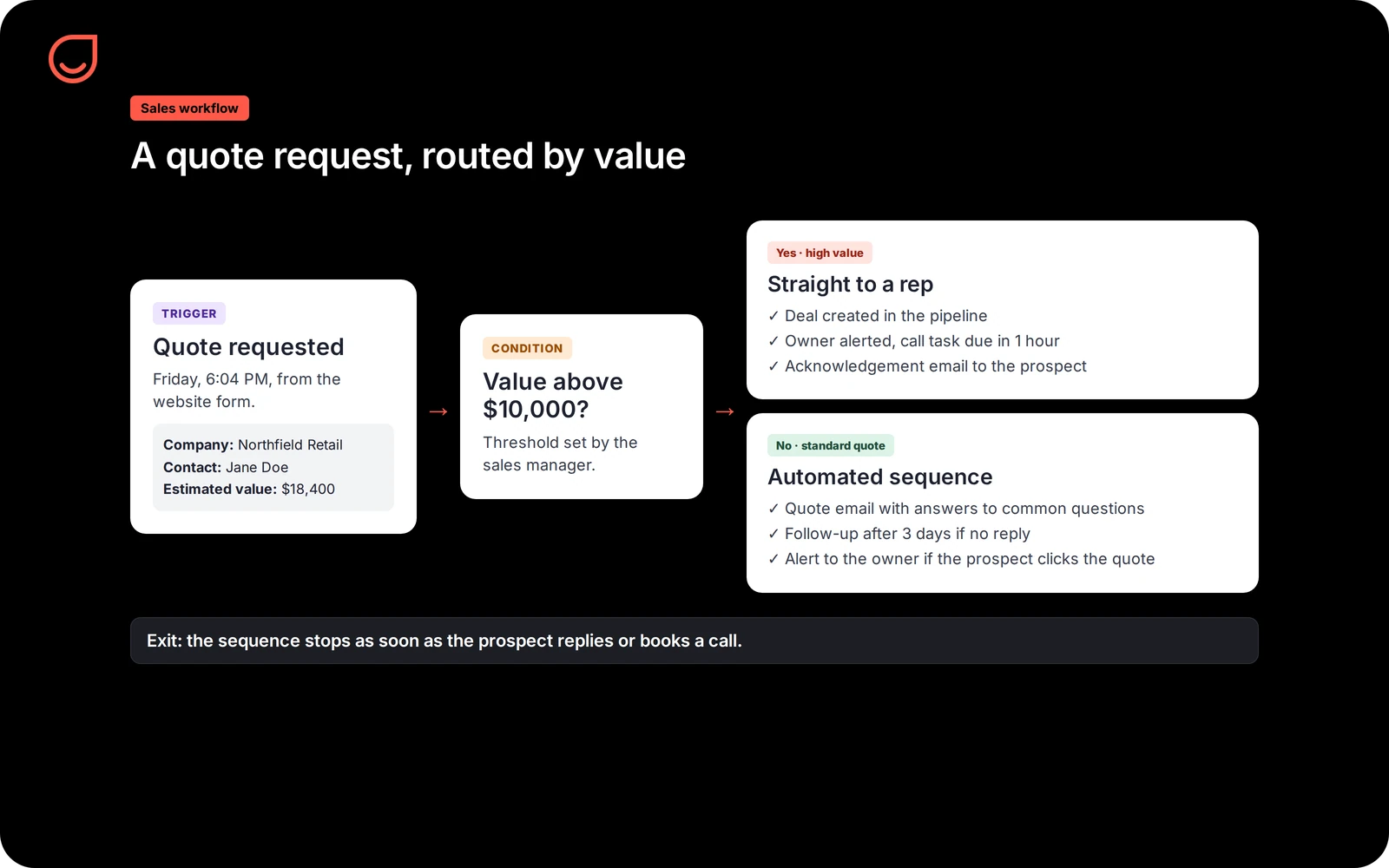
The best candidates are repetitive sales tasks that are frequent, rule-based and costly when they're forgotten. Automated data entry alone saves hours of time consuming administrative tasks every week.
What to keep human
Automation handles volume. Some moments in the sales cycle still need a person:
- Negotiation and pricing exceptions. A discount, a custom contract, a payment schedule.
- Complex deals. Several decision makers, a long cycle, a technical evaluation.
- Key accounts. Customer relationships worth protecting deserve a call from a person.
- Unexpected signals. A complaint, a change of contact, a competitor in the conversation.
Use automation to put the right information in front of the rep at the right time, and let the rep decide what to do with it.
Implementing sales automation: how to automate your sales process in 6 steps
- Map your sales workflow. Write down every step from lead capture to close, with who does what and how long it takes. Mark where leads wait or get lost.
- Pick one bottleneck. Usually response time to new leads or follow-up after a quote. Start there.
- Clean your CRM data. Automation multiplies whatever is in the system, including duplicates and missing owners.
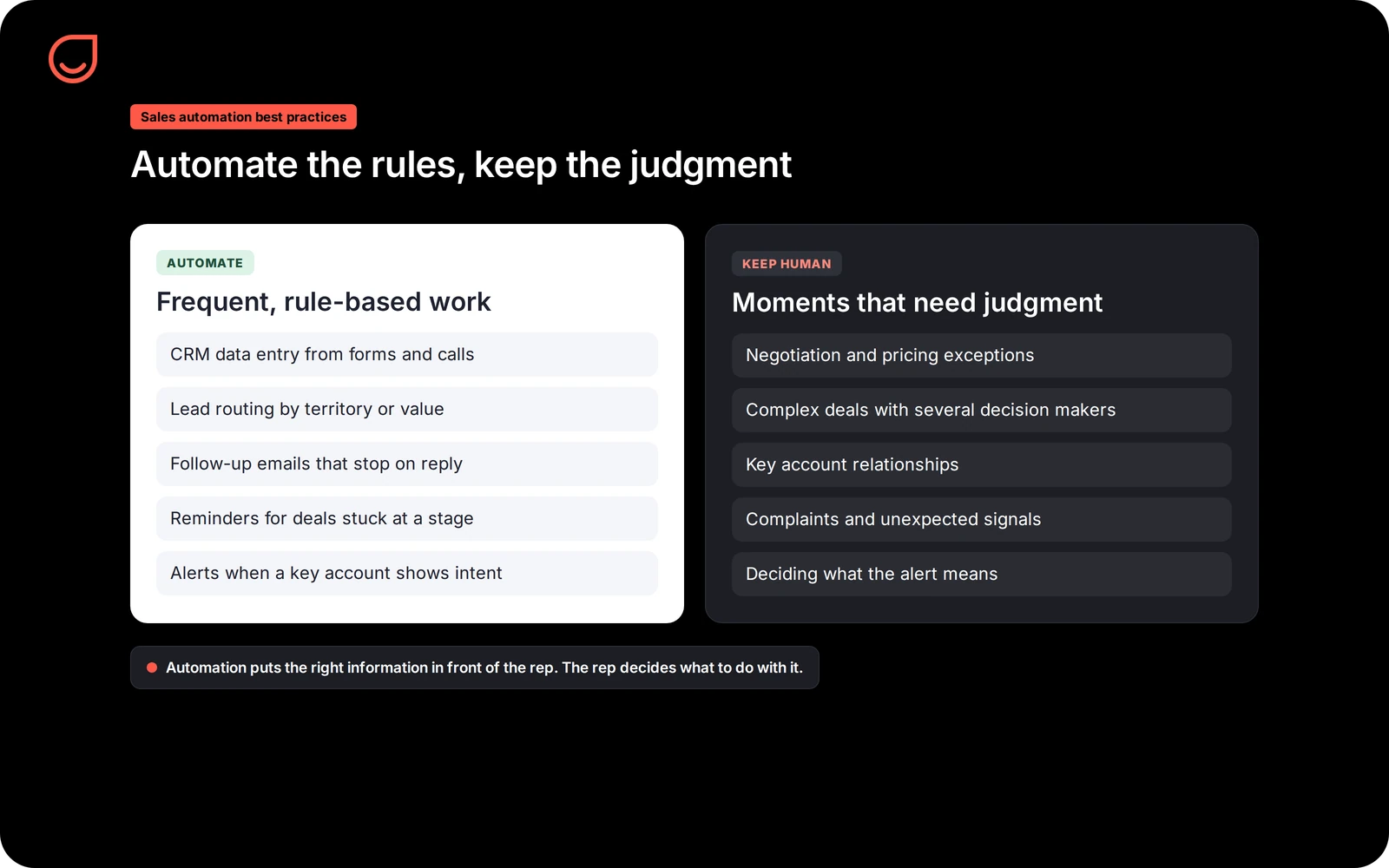
- Define the trigger, condition, action and exit. For example: quote requested, value above a threshold, alert the owner and create a task, exit when a meeting is booked.
- Test with a small segment. Run the workflow on one territory or one product before rolling it out.
- Measure and adjust. Track key metrics such as response time, conversion between stages, sales performance per rep and the share of leads with an owner. Change one thing at a time.
Choosing a sales automation tool
Most sales automation software sits on top of customer relationship management: either your CRM software includes automated workflows, or an automation platform connects to your CRM systems so both read the same data. When comparing sales automation platforms, check whether marketing and sales share one record of customer data and customer behavior, whether lead management and routing rules are easy to change, and whether AI powered features such as scoring suggestions are explained rather than hidden.
Sales automation best practices
- Stop sequences when a human replies. A follow-up that keeps going after the prospect answered looks careless.
- Personalize with real data. Use the prospect's name, company and the topic discussed, pulled from the CRM, and keep the tone of a person writing.
- Keep sales and marketing on one record. When marketing and sales work from the same contact data, a customer never gets a prospecting email after signing.
- Audit workflows regularly. Check emails, alerts and task rules every quarter, and listen to feedback from reps and customers.
- Train the team. Reps should know what each workflow does, how to pause it for a contact and how to report a misfire.
Common sales automation mistakes
- Automating every interaction. Too many automated touches feel robotic and can hurt your sender reputation.
- Automating a broken process. If leads are lost because nobody owns them, automation sends them faster to nobody. Fix ownership first.
- No human oversight. Market conditions change; a workflow nobody reviews keeps doing what made sense last year.
- Ignoring the data. Automation produces reports on every step. If nobody reads them, you don't know whether it works.
Sales workflow automation in Positive User
In Positive User, sales workflows run in the Journey Builder, on the same contact record as your marketing. A form submission, a page visit or a custom event such as a quote request starts the workflow; conditions check the contact's data and behavior; actions send an email or an SMS through your own gateway, create a deal in the pipeline, tag the contact or alert the owner.
Because marketing and sales share one contact record, a lead's full history, from first visit to last email click, is visible to the rep who calls. The full module is described on the Positive User marketing automation page.
{{CTA-BLOG}}
Real examples
Doublet, a French manufacturer of visual communication, converts 25% of its dormant opportunities by routing quotes by value: low value quotes go into an automated sequence, high value quotes go straight to a rep.
Liberty Motors manages 3,500 leads on a single platform and converts 20.5% of them into sales, with every lead assigned and followed up.
FAQ
Automate your sales workflows