Summary
Customer onboarding is the process of guiding new customers from sign-up or first purchase to the moment they get value from a product or service. It combines a welcome message, guidance toward a first action, help when customers stall, and follow-up across email, in-app messages and mobile push. Onboarding works when it reacts to what each customer does and ends at a clear activation moment.
{{BUTTON-1}}
A new customer signs up on Monday, full of good intentions. By Friday they've logged in once, got stuck on the second screen, and moved on to something else. Nobody noticed, because nothing in the process was watching. Customer onboarding is the stretch where a new customer either finds value or quietly leaves, and it's one of the journeys you can automate with the workflows in our marketing automation guide.
What is customer onboarding?
Customer onboarding is the process of guiding new customers from sign-up or first purchase to the moment they get value from your product or service. It combines a welcome email, product guidance, onboarding materials, help at the right time and follow-up, across email, in-app messages and mobile apps. A structured process to guide customers turns account creation and initial setup into product adoption.
Onboarding ends when the customer succeeds. Define that moment first: the first project created, the first order received, the first report shared.
Why is customer onboarding important?
The first days shape everything after, for the entire relationship. Customers who reach value quickly are more likely to stay, buy again and recommend you; customers who struggle are more likely to churn before they ever see what you offer. An effective customer onboarding process reduces support requests for your support teams, shortens time to value, lowers customer churn and builds loyal customers from the start. Successfully onboarded customers stay longer, which raises customer lifetime value and customer retention rates, and supports customer satisfaction and customer engagement over the whole customer journey.
The customer onboarding process in 6 steps: an onboarding strategy that works
- Define the activation moment and the customer goals. The action that shows a new customer is getting value, based on what they want to achieve. In SaaS, a key feature used; in ecommerce, a second order or a product in use.
- Send a welcome message right away. Confirm the sign-up or the order, set expectations and point to the first step.
- Guide the first action. One clear next step per message, with a link straight to where it happens.
- React to behavior. Customers who complete a step move on; customers who stall get help, a tip or a human check-in from your customer success team. Different customer segments can follow different onboarding paths.
- Celebrate progress. Acknowledge milestones so customers see what they've achieved.
- Collect feedback and hand over. Ask new customers how onboarding went, then move activated customers to your regular customer journey. Customer feedback is the fastest way to improve onboarding content.
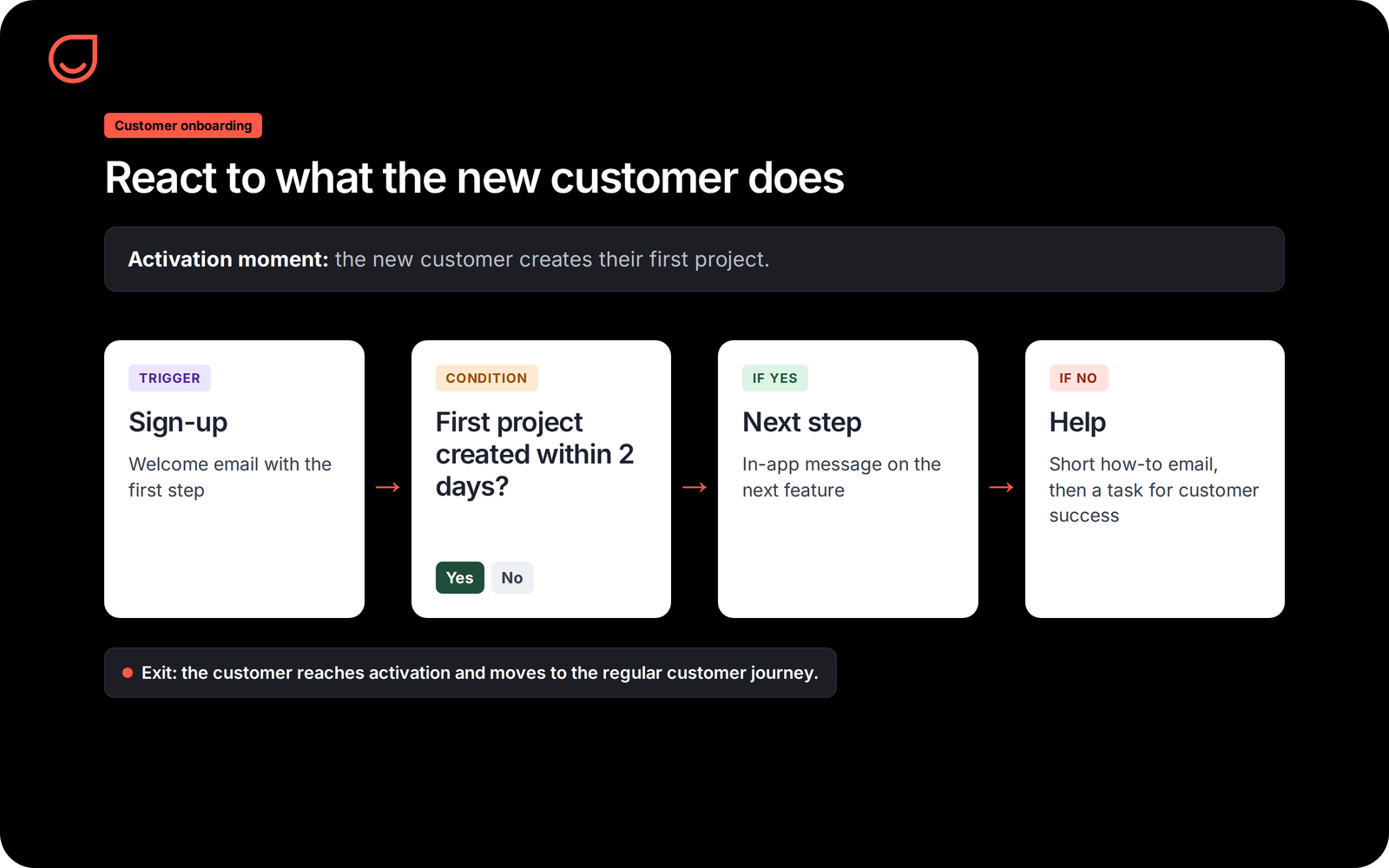
Onboarding emails: a simple sequence
Base the sequence on behavior rather than dates alone: a customer who already completed a step shouldn't get the email explaining it.
Onboarding by business type
- SaaS and apps: for a SaaS business, product tours, in-app messages and mobile push guide new users to the key feature; onboarding flows by email bring back those who drift away.
- Ecommerce: the order confirmation, delivery updates and a how-to-use message once the product arrives make the first purchase a good experience and prepare the second.
- B2B services: the client onboarding process for a new client relies on a kickoff call, a dedicated team or customer success managers, training sessions and a shared plan; automation handles routine tasks such as reminders and check-ins. The sales rep hands the account over with everything learned during the sale, ideally in your customer relationship management system.
Customer onboarding best practices
- Use onboarding templates for repetitive tasks. Standard operating procedures and support materials keep the experience consistent, so your team focuses on the conversations that need a person.
- One goal per message. Several calls to action in one email dilute all of them.
- Personalize by what the customer bought or chose. A customer on one plan or with one product doesn't need instructions for another.
- Use the channel that fits the moment. In-app messages while the customer is in the product, email when they're away.
- Watch the drop-off points. Measure where new customers stop and fix that step first.
- Make it easy to reach a person. Some customers need a human answer, and onboarding is when it matters most.
Customer onboarding software: onboarding with Positive User
Onboarding software automates the onboarding journey so customers onboard at their own pace. In Positive User, onboarding runs as a workflow in the Journey Builder. A sign-up, a first order or a custom event from your product starts it; conditions check what the customer has done; actions send an email, an in-app message or a mobile push notification, or create a task for your team. The e-commerce welcome sequence use case shows a ready-made starting point.
innogy go!, a car sharing service in Warsaw and a Positive User customer, recovers 6% of its signups each month from people who started registration and stopped halfway.
{CTA-BLOG}}
Common customer onboarding mistakes
- A fixed calendar of emails. Sending day-3 instructions to someone who finished on day 1 feels careless.
- Too much at once. A long welcome email with every feature overwhelms instead of guiding.
- No definition of success. Without an activation moment, you can't tell whether onboarding works.
- Stopping too early. Some customers need more time; keep a light follow-up for those who haven't activated yet.
FAQ
Start with the activation moment
Write down the one action that shows a new customer is getting value, measure how many reach it today, and build a first workflow that helps those who stall before it.
Automate your onboarding journey